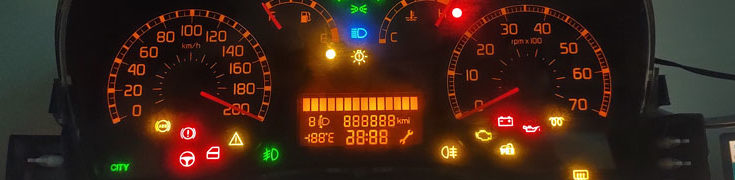


As some of you know, almost every modern car is equipped with CAN-BUS network, that’s responsible for carrying messages (aka communication) between in-car modules (e.g. the engine control unit [ECU] communicates with instrument cluster and gives it information of coolant temperature, oil level, RPMs etc.).
Some modules like radio or instrument cluster are interactive and they’re displaying information for the driver and/or can accept an input from driver. Inspired by the Silas Parker’s idea – I’ve decided to use the instrument cluster to… play games!
At first – it was quite a pain, as I wanted to use Fiat Panda instrument cluster, but nobody has ever done that, so there was absolutely no information on how to communicate with the cluster. After all – it turned out, that it was the best possible choice, as almost every function in the cluster is CANBUS-controlled. Thanks to that – it reduces the need of creating custom, analog input to drive warning lights etc. After studying the basics of CANBUS, equipped with an Arduino and CAN-BUS hat, I went down to my car and started to create logfiles with a RAW communication from an Infotainment CAN-BUS (the one that’s behind an instrument cluster). After producing almost 1GB of text files during many different conditions (staying with engine on, off, during driving etc.), I’ve went home, wired up my spare instrument cluster and started feeding it with previously logged messages.
The cluster went crazy, different controls were constantly blinking, some alarams came up etc. So the first step was to filter out the list of messages and feed the cluster with only frame type at once. That gave me some point of view on which frame does what. After that – I’ve been messing with messages’ values. Every few seconds I’ve changed one byte to see what will happen and wrote it down. Finally – I’ve came up with some basic code, and using the Silas’s ETS2 plugin) – I’ve got it working:
Many, many days later… I’ve got almost everything working and here’s a pre-final version during game-play:
Here, at this page, I’ll post all of my solutions and updates on the project, so please – stay tuned!