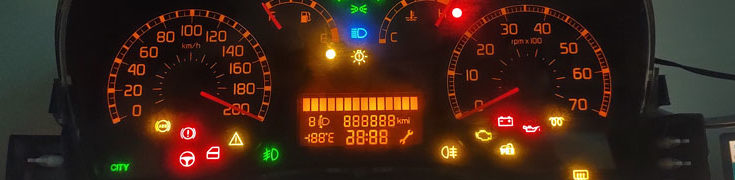


I’ve finally managed to write some code and here’s what I’ve done so far:
- speedometer,
- fuel gauge,
- temperature gauge,
- rpm’s,
- direction (and hazard) indicators,
- position/low beam lamps indicator,
- high beam lamps indicator,
- alternator/battery charging indicator,
- glow plugs preheating (SCS didn’t include this in it’s telemetry so it’s on when the engine is off but the electrics/ignition is on,
- parking brake indicator,
- check engine indicator (it’s based on the damage level of the truck and is aligned with the indicator on the in-game cluster),
- low oil level indicator,
- low air pressure in brake system (yellow trinagle with an exclamation mark),
- cruise control indicator (well, in the above cluster you can see it as “CITY” indicator, but it’s simple to work this out, as the cluster has physically a place with CC indicator),
- low fuel level indicator (yellow light; flashing when fuel level is below 1%),
- too high coolant temperature indicator,
- the clock is synchronized with the in-game time, but only for CET time zone. Unfortunately, SCS don’t provide an information of current time zone via the telemetry. I’ll keep looking for the solution,
- the date is a real date of in-game time. Start of new game (profile) is always on monday, so day zero is 01.01.2001 (monday) and the days are being count starting from then.
A this stage – I’m trying to figure out how to reprogramm the odometer using CAN bus only (so far, I’ve figured out how to increase the odometer value, but not how to decrease it).
I’ve built a installation package for the plugin for both – ETS2 and ATS, so you should be able to easily install it (tested with Steam version of both games, but it should be compatible with standalone as well). The file is available for download here: https://fruba.pl/canbus/download/